Mass email blasts are no longer effective. In 2026, customers expect personalized messages that speak directly to them. They don’t want a generic promotion. They want relevance. Klaviyo makes this easy by offering dynamic tags and custom properties that scale 1:1 personalization.
With a few smart variables and conditional logic, you can automatically tailor each email to the subscriber. Whether you’re referencing their name, last purchase, or product preferences, these techniques make your emails more engaging and profitable.
This guide demonstrates how to utilize Klaviyo’s personalization features to create high-converting, customized experiences within every email.
What Are Dynamic Tags and Why Do They Matter?
Dynamic tags in Klaviyo are snippets of code that automatically insert customer-specific data. They’re enclosed in double curly braces like this: {{ first_name }}.

Klaviyo replaces these tags with real data when the email is sent. So instead of “Hey there,” your customer sees “Hey Jordan.”
Beyond names, you can also pull in information such as favorite product categories, location, or the date of the last order. These personal touches build trust and drive better engagement across campaigns and flows.
Essential Dynamic Tags You Should Be Using
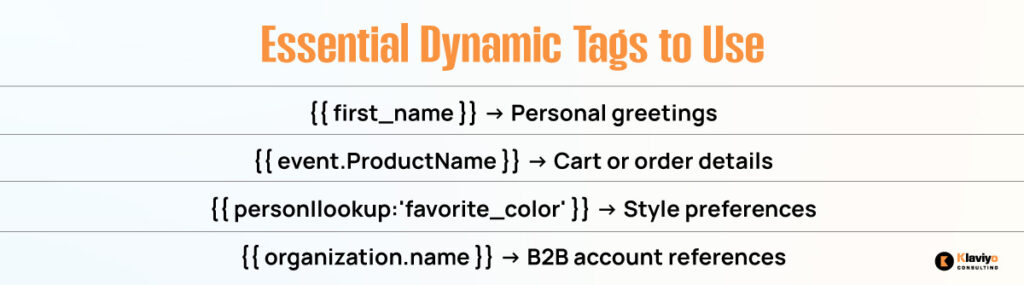
Klaviyo includes many useful tags out of the box. Here are some of the most effective for personalization:
{{ first_name }}
This tag inserts the recipient’s first name. Use it in subject lines, greetings, or calls to action. To ensure smooth fallback, add a default like this:
Hi {{ first_name|default:’there’ }}
{{ event.ProductName }}
Use this in post-purchase or cart flows to reference the exact product with which someone interacted. It brings specificity and helps increase conversions.
{{ person|lookup:’favorite_color’ }}
Custom fields can store user preferences such as favorite color, size, or category. Use the lookup method to reference those fields in your content.
{{ organization.name }}
For B2B audiences, reference company names or accounts to personalize outreach and follow-up emails.
Set Up Custom Properties in Klaviyo
Custom properties help you store unique subscriber data beyond standard fields. You can collect them through signup forms, quizzes, integrations, or directly from Shopify.
For example, you might add a dropdown to a popup asking “What’s your favorite category?” That value gets stored as a property and can be referenced later using {{ person|lookup:’category_preference’ }}.
You can use this data to segment users, trigger automated flows, or completely overhaul the email experience.
Use Conditional Logic to Personalize Content Blocks
Klaviyo supports “if/else” logic within emails. This allows you to display different content based on customer attributes.
Here’s an example of conditional content based on gender:
{% if person|lookup:’gender’ == ‘female’ %}
<p>Explore our latest collection for women</p>
{% else %}
<p>Check out our new arrivals</p>
{% endif %}
You can change messaging, product sections, offers, or even entire layouts depending on who is reading. This level of flexibility enables you to create a single email that behaves differently for different audiences.
Personalize Product Recommendations
Using Klaviyo’s product feeds, you can show dynamic recommendations based on browsing or customer behavior.
Filter product blocks by:
- Purchase history
- Most viewed items
- Specific tags or categories
- Gender preference
- Location-based suggestions
If someone recently browsed hiking gear, you can show related items instead of a generic sale grid. These personalized blocks help increase click-throughs and average order value.
Real Use Cases That Drive Results
Let’s bring it to life. Here are practical, real-world strategies using dynamic tags and properties in Klaviyo:
Post-Purchase Flows
Reference the product someone bought and recommend an accessory. For example, “Thanks for your backpack order. Want to add a waterproof cover?”
Gender-Based Campaigns
Show different product lines to men and women using conditional logic. This prevents irrelevant messaging and makes the email feel intentional.
Location-Specific Copy
Add local references, such as “2-day delivery available in Austin.” It builds trust and urgency without needing a full campaign change.
VIP Rewards and Loyalty
Use total spend or CLV fields to segment and recognize your highest-value customers. Offer early access, larger discounts, or exclusive content.
Mistakes to Avoid When Personalizing Emails
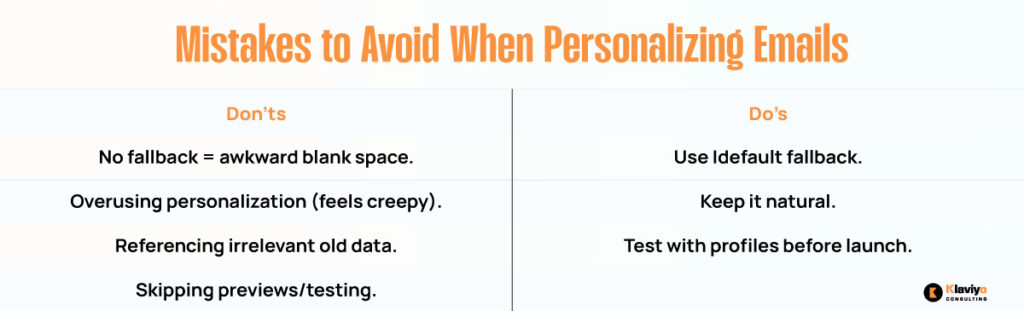
With great power comes great email responsibility. Avoid these common missteps when using dynamic content:
Missing Fallbacks
If you use a tag like {{ first_name }} without a fallback and the data is missing, it creates an awkward blank space. Always use |default: for smooth backup content.
Overusing Tags
Don’t make every line personalized. It can come off as unnatural or creepy. Balance is key.
Using Old or Irrelevant Data
Don’t reference a past order from a year ago unless it’s part of a reactivation campaign. Stay fresh.
Failing to Test
Always preview and test your email with different user profiles before sending it live. Klaviyo offers testing tools to check exactly how the email will render.
Make Every Email Feel Like It Was Meant Just for Them
Klaviyo gives you powerful tools to personalize at scale. Using dynamic tags and custom properties, you can create emails that feel more like conversations and less like campaigns.
The more relevant and useful your emails feel, the more likely people are to open, click, and convert. Whether it’s a name, a product suggestion, or a custom offer, small touches create massive results. By 2026, personalization will be the standard. When used right, it’s also your unfair advantage.