Key Takeaways:
- A post-purchase flow in Klaviyo is a marketing automation that triggers after someone buys, and it exists to build the relationship that leads to a second order, not to confirm the transaction.
- Most stores trigger the flow on Placed Order, but Fulfilled Order gives you far better timing control for review requests and product education.
- Trigger filters and conditional splits let you separate first-time buyers from repeat customers, which is the single biggest quality difference between an average flow and a strong one.
- A practical post-purchase flow usually runs four to six messages across roughly 30 days, moving from thank-you to education to review request to cross-sell.
- Discounting in the first email is the most common mistake, because it teaches customers to wait for an offer instead of paying full price.
- Measure the post-purchase flow on revenue per recipient and repeat purchase rate rather than open rate, then test timing before you test copy.
Most ecommerce brands pour effort into acquisition automation and then go quiet the moment money hits the account. The welcome series is polished, the cart abandonment emails are tuned, and the customer who just spent $90 receives a shipping notification and nothing else. That gap is where a well-built post-purchase flow in Klaviyo earns its keep.
This guide walks through the actual build inside the Klaviyo flow builder: which trigger to choose, which filters to apply, how to time delays, and where conditional splits belong. It also includes five post-purchase flow examples you can model directly, the mistakes that quietly cost revenue, and the metrics that tell you whether the flow is working. If you want the strategic and revenue-modeling side of this topic, our guide on post-purchase flows that increase LTV covers that ground in more depth.
What is a Post-Purchase Flow in Klaviyo?
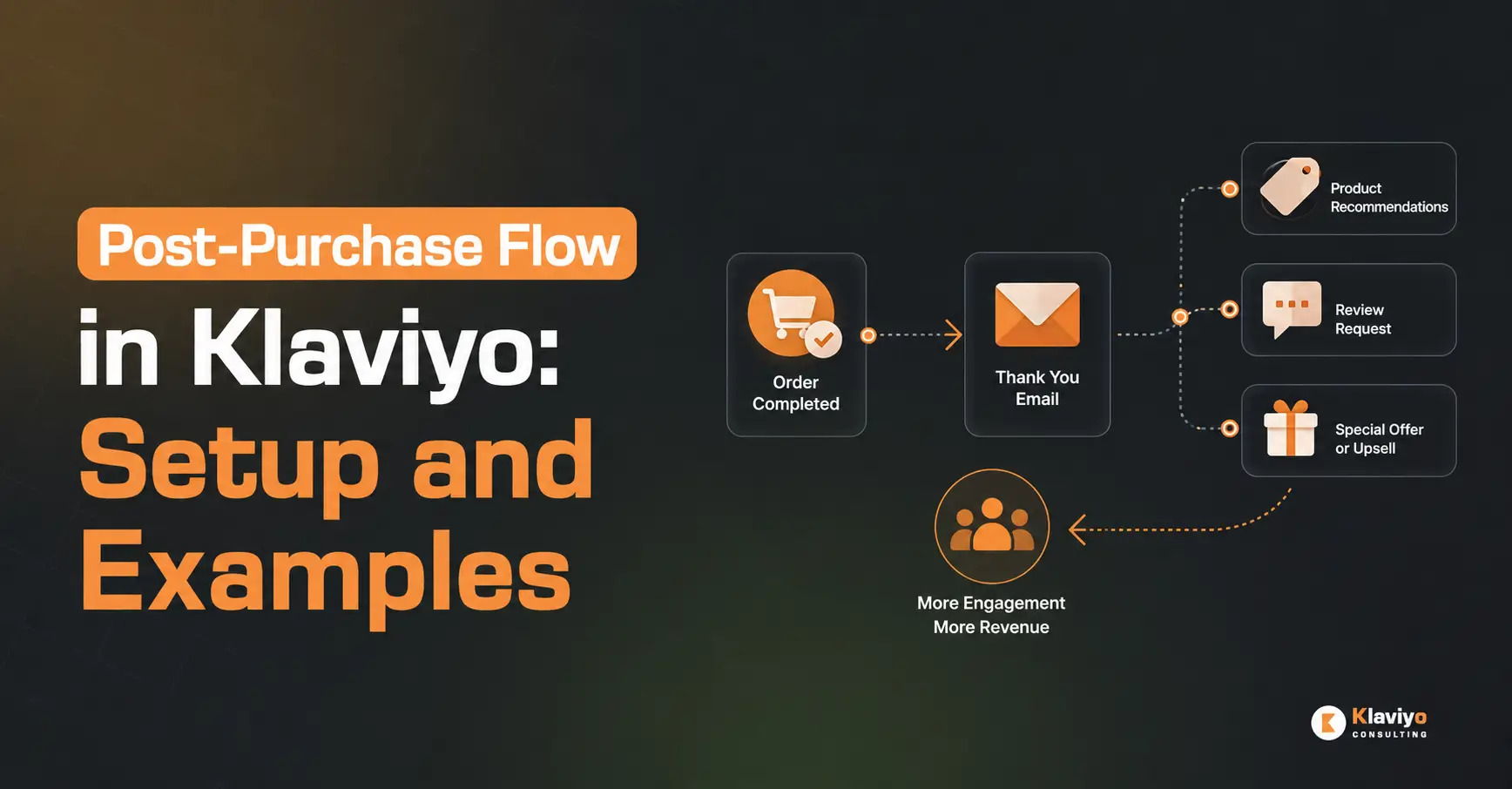
A post-purchase flow in Klaviyo is an automated email or SMS sequence that triggers after a customer completes an order, designed to strengthen the relationship and drive a repeat purchase. It typically includes a thank-you message, product education, a review request, and a relevant cross-sell, spread across the weeks following the order.

The purpose is deliberately different from a transactional notification. A confirmation email tells someone their order went through. A post-purchase flow tells them they made a good decision, shows them how to get the most out of what they bought, and gives them a reason to come back. One reduces uncertainty. The other builds lifetime value.
Post-purchase automation sits alongside the other core lifecycle sequences every store should have running. If you are still filling gaps in your automation coverage, our breakdown of the top email flows every Shopify store should set up shows where post-purchase fits in the wider system.
How a Post-Purchase Flow Differs From Order and Shipping Notifications
Order confirmations and shipping updates are usually sent by your ecommerce platform, and they are transactional. Customers receive them regardless of marketing consent, and they are expected to be short and functional.
Post-purchase flows in Klaviyo are marketing sends. They respect consent, they respect smart sending rules, and they are unsubscribable. Because of that, treat them as brand communication rather than logistics. Do not stuff shipping details into a post-purchase marketing email, and do not turn your confirmation email into a cross-sell vehicle. Keeping the two separate protects clarity and keeps your transactional sends clean.
Why Post-Purchase Flows Matter for Ecommerce Brands
Acquiring a customer is the expensive part. Once someone has bought, you already have permission, purchase context, and product data, three things that make the next sale considerably easier to earn than the first. Post-purchase automation is how you use that advantage systematically instead of hoping people remember you.
There are four practical returns on a well-built flow:
- Second-purchase momentum. The window immediately after a first order is when brand enthusiasm peaks. A relevant follow-up during that window converts better than the same message sent months later.
- Review and UGC generation. A timed review request produces social proof at scale, which then improves conversion rates on your product pages and ad creative.
- Fewer support tickets. Product education emails answer the “how do I actually use this” questions before customers write in.
- Stronger sender reputation. Recent buyers open and click at high rates. Consistent engagement from this segment supports deliverability across your whole account.
If you want to cite specific retention or repeat-purchase benchmarks in your own content, pull them from a credible published source such as Klaviyo’s own benchmark reporting rather than relying on figures floating around the internet.
What You Need Before You Build the Flow
A post-purchase flow depends entirely on clean data. If your order events are not reaching Klaviyo reliably, the flow will misfire, skip customers, or personalize with the wrong products.
Before you build, confirm the following:
- Your ecommerce integration is connected and actively syncing
- The Placed Order metric is firing, with recent events visible in your account
- Fulfilled Order events are coming through if you plan to trigger on fulfillment
- Your product catalog is synced so dynamic product blocks render correctly
- Profile properties you plan to personalize with, such as first name and order details, are actually populated
- SMS consent is collected properly if the flow will include text messages
Confirm Your Klaviyo Integration Is Syncing Orders Correctly
Open your Metrics tab and check the activity timeline for Placed Order. You should see events appearing in near real time, each with line-item data attached. If events lag, arrive in batches, or come through without product details, fix that before building anything.
Shopify stores in particular should verify that products, orders, and customer records are all flowing correctly. Our walkthrough on the Klaviyo and Shopify integration sync covers the settings that most often cause missing or incomplete order data.
How to Set Up a Post-Purchase Flow in Klaviyo (Step by Step)
Here is the build sequence. If you have never used the flow builder before, our guide on how to set up your first Klaviyo flow covers the interface basics in more detail.
- Create the flow. Go to Flows, select Create Flow, and start from scratch rather than a template. Templates give you generic timing and generic copy that you will end up rewriting anyway.
- Set the trigger. Choose Metric as your trigger type, then select Placed Order or Fulfilled Order depending on the flow’s purpose.
- Add trigger filters. Narrow who enters the flow. For example, only customers whose Placed Order count equals one, or only orders above a certain value.
- Set flow filters. Add exclusions so people who no longer qualify stop receiving messages. Common exclusions include customers who have since placed another order or who have already left a review.
- Add time delays. Map your cadence across the full sequence before writing a single email.
- Add conditional splits. Branch on customer type, product purchased, or discount usage so the content actually matches the buyer.
- Build the emails. Use dynamic product blocks to pull in what the customer actually bought.
- Confirm conversion tracking, then go live. Check that Placed Order is set as your conversion metric, switch smart sending on, and move the flow from Draft to Live.
Choosing the Right Trigger and Trigger Filters
Placed Order fires the moment the order is created. Use it for the thank-you email and anything else that should land while the purchase is still fresh.
Fulfilled Order fires when the order ships. Use it for review requests and product education, because those messages only make sense once the customer physically has the product. Triggering a “how do you like it?” email on Placed Order is how brands end up asking for reviews from people whose parcels are still in a warehouse.
Many stores run both: a short Placed Order flow for the immediate thank-you, and a longer Fulfilled Order flow for education, reviews, and cross-sell. Trigger filters then refine entry. Filtering on Placed Order count equals one creates a dedicated first-time buyer experience. Filtering on a specific collection lets you build product-specific sequences for categories that need real onboarding.
Using Conditional Splits for First-Time vs Repeat Customers
A first-time buyer needs reassurance, brand context, and usage guidance. A fourth-time buyer needs none of that. They need to know what to try next, or they need loyalty recognition. Sending both the same “welcome to the family” email wastes the message on half your audience.
Add a conditional split early in the flow on the Placed Order count profile metric, then write separate paths. This is where segmentation logic pays off directly, and the same thinking that powers your list segments applies inside flows. Our guide to Klaviyo segmentation strategies covers the conditions worth building around.
Timing and Delay Settings That Work
Timing depends on your product’s consumption cycle, but this cadence is a reliable starting point for most stores:
- Email 1: immediately or within a few hours of purchase
- Email 2: 3 days after fulfillment
- Email 3: 7 to 14 days after fulfillment, adjusted to your average delivery time
- Email 4: 21 to 30 days after purchase
- Email 5: aligned to your replenishment cycle for consumables
Use smart sending to prevent overlap with campaigns, and set your delays to send during reasonable local hours rather than firing at 3am.
Post-Purchase Flow Examples You Can Model
1. Thank-you and brand story (Day 0). Confirm the good decision, set delivery expectations in one line, and share who you are in two short paragraphs. No discount, no cross-sell. Subject line direction: gratitude plus a hint of what is coming.
2. Product education (Day 3 after fulfillment). Show the customer how to use what they bought. Care instructions, setup steps, recipes, styling ideas, whatever reduces friction and increases satisfaction. Pull in the exact purchased product using dynamic blocks so the advice is specific. Our guide on dynamic tags and custom properties covers the personalization syntax for this.
3. Review and UGC request (Day 7 to 14 after fulfillment). Ask once, make it a single click, and time it to land after the product has arrived and been used at least once. Adding a photo prompt gives you UGC alongside the star rating.
4. Cross-sell and replenishment (Day 21 to 30). Recommend complements to what they bought, not random bestsellers. For consumables, time this to when the first order runs low. Klaviyo’s predictive fields help here, and our article on using predictive analytics to drive repeat purchases explains how to use expected date of next order in flow logic.
5. Loyalty or VIP invitation (repeat buyer path only). For customers on the repeat branch, skip the education and invite them into your loyalty program, early access list, or referral scheme.
Sample Flow Timeline for a Shopify Store
Trigger on Fulfilled Order, then Day 0 thank-you, Day 3 education, and a conditional split on Placed Order count. The first-time path receives a review request on Day 10 and a cross-sell on Day 25. The repeat path receives a review request on Day 8 and a VIP invite on Day 20.
Common Post-Purchase Flow Mistakes to Avoid
- Discounting in email one. A code sent hours after purchase trains customers to wait for offers and can trigger refund requests from people who just paid full price.
- Ignoring delivery time. Review requests sent before arrival read as tone-deaf and depress response rates.
- One path for everyone. No split between first-time and repeat buyers means half your audience gets irrelevant content.
- No exclusions for returns or cancellations. Add flow filters so cancelled and refunded orders exit the sequence.
- Overlapping with other flows. A customer who buys after abandoning a cart can end up in both sequences at once. Review your abandoned cart email best practices setup and add exit conditions so the flows do not collide.
- Generic cross-sells. Recommending unrelated products signals that you are not paying attention to what they bought.
- Smart sending switched off. Without it, post-purchase emails stack on top of campaign sends and fatigue your best customers.
How to Measure and Improve Your Post-Purchase Flow
Open rate tells you almost nothing about a post-purchase flow, because recent buyers open everything. Judge the flow on outcomes instead:
- Revenue per recipient for each individual message
- Placed order rate per email, which shows which message actually drives the second purchase
- Repeat purchase rate for customers who completed the flow versus those who did not
- Review submission rate on your review request message
- Unsubscribe and spam complaint rate, which flags cadence problems early
Once you have four to six weeks of data, test in order of impact. Timing first, because delay changes move numbers more than wording does. Then offer structure. Then subject lines and creative. Run one variable at a time and let the test reach a meaningful sample before calling it. Our guide to A/B testing subject lines and content explains how to structure those tests inside Klaviyo.
Work With a Klaviyo Consultant to Build Your Post-Purchase Flow
Building a post-purchase flow is straightforward. Building one that fits your specific catalog, delivery times, margins, and repeat-purchase cycle takes more judgment, and it is easy to lose months guessing at cadence.
Our team audits your existing automation, maps a post-purchase sequence around your actual order data, and builds the flow logic, splits, and templates alongside your wider lifecycle program. If you would rather have that handled properly the first time, review our Klaviyo consultant services to see what an engagement covers.
Final Thoughts
A strong post-purchase flow in Klaviyo comes down to a few decisions made carefully: trigger on the event that matches the message, filter entry so the right people get the right path, time delays around real delivery windows, and split first-time buyers from repeat customers. Get those right and the emails almost write themselves.
Start with three messages rather than waiting until you have a perfect six-email sequence. Thank-you, education, review request. Get them live, watch revenue per recipient for a month, then expand with cross-sell and loyalty branches based on what the data shows. Once post-purchase is running, the natural next build is a win-back flow in Klaviyo to catch customers who go quiet after that first cycle.
Ready to Turn One-Time Buyers Into Repeat Customers?
If your post-purchase automation is missing, outdated, or underperforming, a short conversation will tell you where the gaps are. Book a free strategy call and we will walk through your current flows and where the fastest retention gains sit.